Bitrate Myths for Creators (2025): What Survives Re-Encode
Best bitrate for YouTube 2025 isn’t about brute Mbps. If your upload turns mushy after the platform re-encodes it, the fix is smarter structure: clean frames, disciplined keyframes, and sane targets. Below, we’ll bust persistent myths, show what platforms actually keep (and what they destroy), and give you export recipes that hold up for 1080p, 1440p, 4K—and vertical platforms—without guesswork.
Table of Contents
- Bitrate Myths (Busted)
- What Actually Survives Re-Encode
- Best Bitrate for YouTube 2025 — Upload Settings
- Shorts/Reels/TikTok: Staying Clean Under Mobile Caps
- Best Bitrate for YouTube 2025 — Export Cheatsheet
- Quality Tricks That Survive Re-Encode
- Common Mistakes (And Quick Fixes)
- FAQ
- Free Presets & One-Page Checklist
Bitrate Myths (Busted)
- “More bitrate = always better.”Past reasonable targets, platforms still transcode. Extra bits don’t rescue shaky GOPs, banded gradients, or ringing edges.
- “CBR beats VBR for uploads.”Constant bitrate wastes bits on easy frames and starves complex ones. For file uploads, VBR 2-pass typically preserves detail better at the same size.
- “Sharpen hard before uploading.”Over-sharpening creates halos that look worse after re-encode. Prefer gentle local contrast and edge protection.
- “Always upscale to 4K.”Upscaling can unlock a stronger ladder on some platforms, but it won’t invent detail. Test on your footage, don’t assume.
What Actually Survives Re-Encode
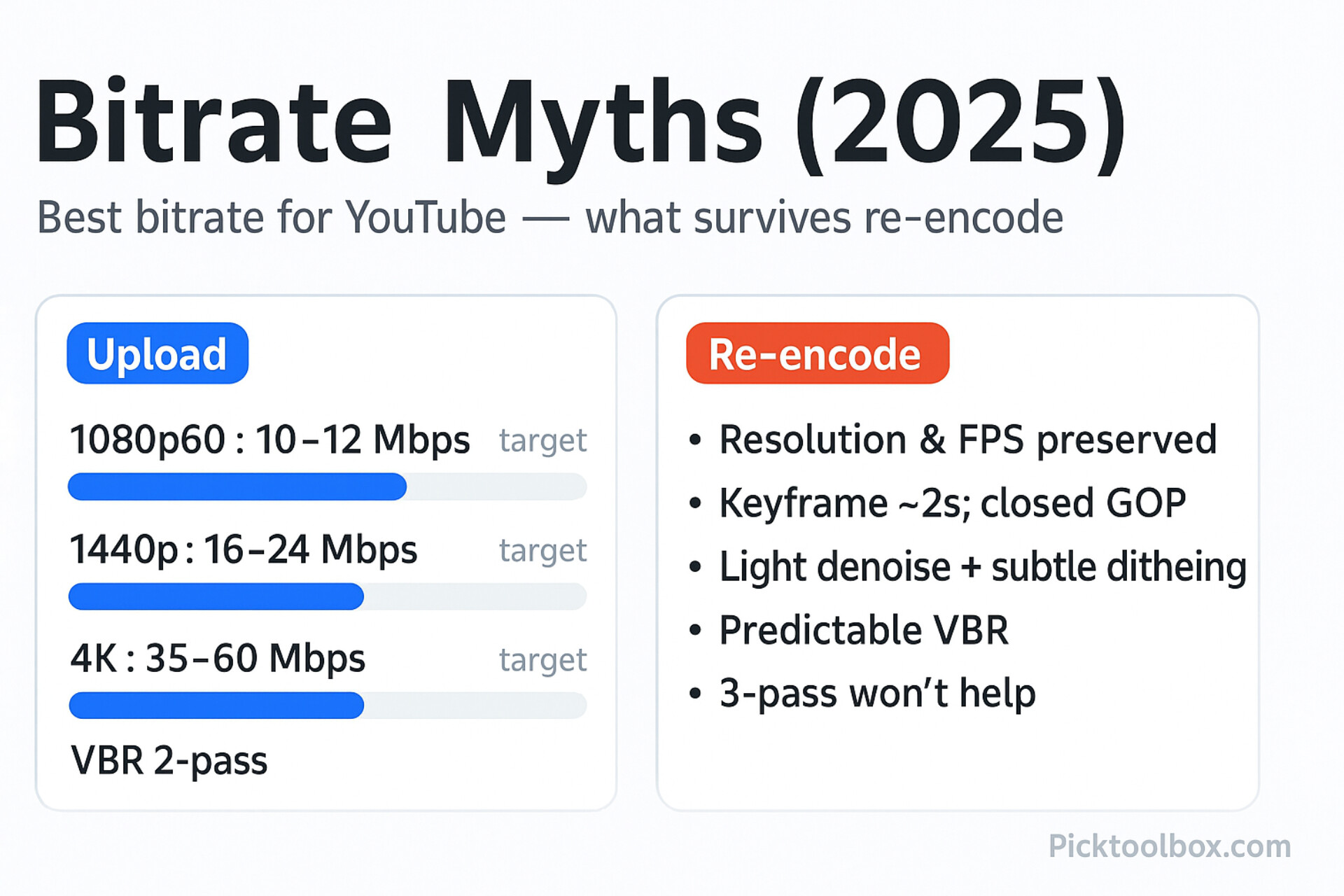
- Resolution & FPS: Platforms keep your frame size and frame rate; a clean 2160p30/60 often maps to a higher quality ladder than 1080p.
- Keyframe discipline: Closed GOP and a ~2 s keyframe interval help the next encoder track motion cleanly.
- Signal cleanliness: Light denoise on flat walls/gradients; add subtle dithering to resist banding.
- Predictable rate control: VBR 2-pass with sane targets makes recompression less destructive.
Best Bitrate for YouTube 2025 — Upload Settings
These targets mirror YouTube’s own recommendations and what consistently survives re-encode. If your scene is unusually noisy (water, grass, handheld night), use the top of each range.
Container & Codec
- Container: MP4, fast start (moov atom first).
- Video: H.264 High Profile, progressive (4:2:0, CABAC), closed GOP.
- Audio: AAC-LC, 48 kHz, stereo (160–320 kbps).
Bitrate Targets & Frame Controls (Uploads)
- 1080p30: target 8–10 Mbps (VBR 2-pass), max 12–15 Mbps.
- 1080p60: target 10–12 Mbps, max 16–20 Mbps.
- 1440p30/60: target 16–24 Mbps, max 25–30 Mbps.
- 2160p30: target 35–45 Mbps, max 53–60 Mbps.
- 2160p60: target 53–68 Mbps, max 75–85 Mbps.
- Keyframes: ~2 s; keep B-frames on; match source frame rate (don’t force 60 if shot at 30).
Why these numbers? They align with YouTube’s recommended upload bitrates and encoder behavior—your file acts as a clean mezzanine that won’t fall apart when transcoded.
Shorts/Reels/TikTok: Staying Clean Under Mobile Caps
- Resolution: 1080 × 1920 (9:16) vertical; keep safe-zones for UI overlays.
- Bitrate targets (1080p): ~4–8 Mbps at 24/30 fps; ~8–12 Mbps at 60 fps.
- Audio: AAC-LC 128–192 kbps; consistent loudness.
- Frame & GOP: Constant frame rate; closed GOP ~2–5 s to avoid jitter after recompression.
- Typography: Avoid ultra-thin fonts; use 2–3 px stroke or a soft plate behind text.
Best Bitrate for YouTube 2025 — Export Cheatsheet
- 1080p30: 8–10 Mbps VBR 2-pass; max 12–15.
- 1080p60: 10–12 Mbps; max 16–20.
- 1440p: 16–24 Mbps; max 25–30.
- 4K (2160p30/60): 35–68 Mbps target depending on motion; enable 2-pass for busy scenes.
- Keyframes: ~2 s; closed GOP; B-frames on.
- Audio: AAC-LC 48 kHz, 160–320 kbps stereo.
- Shorts/Reels/TikTok: 1080×1920; ~4–12 Mbps depending on fps/motion.
Quality Tricks That Survive Re-Encode
- Denoise first, lightly: Clean sensor noise on flat areas; add subtle dithering to gradients.
- Protect edges, don’t oversharpen: Use mild micro-contrast; avoid halo-causing sharpen.
- Motion sanity: Stabilize micro-jitter; avoid rapid micro-details that shimmer after re-encode.
- 2-pass for chaos: Crowds, water, foliage, handheld street—always 2-pass.
- Stick to mainstream formats: H.264 High Profile 4:2:0; exotic chroma won’t survive the ladder.
Common Mistakes (And Quick Fixes)
- Uploading heavy CBR “just in case”: Switch to VBR 2-pass; allocate bits to hard scenes.
- Leaving VFR or interlacing: Lock to CFR; deinterlace to true progressive before export.
- Forcing 4K vertical by default: Test first; many mobile pipelines cap effective quality.
- Messy keyframes: Keep ~2 s; close your GOPs to prevent smearing on cuts.
FAQ
Should I upscale 1080p to 4K for YouTube?
Sometimes it helps reach a higher-quality ladder, but it won’t create real detail. Try an A/B on a representative video before making it standard.
CBR or VBR for uploads?
VBR 2-pass is the safer default for complex footage. CBR can be fine on simple talking-head, but rarely outperforms well-tuned VBR.
H.265/HEVC vs H.264 for upload?
They’re valid mezzanines, but platforms will recompress either way. If size/time matters, a clean H.264 High Profile upload is perfectly acceptable.
Free Presets & One-Page Checklist
Grab the export presets (1080p/1440p/4K; 16:9 & 9:16) and the one-page checklist so you never guess bitrates again. Import, run one test, and ship.